
LinkedIn: Community & Network
LinkedInBusiness
3.8104.05K Reviews
- Version
- 4.1.1272
- Installs
- 1.00B
- Age Rating
- Everyone
Screenshots

Our Review of LinkedIn: Community & Network
 Analysis by Appyee
When I first open LinkedIn, I’m not looking for a perfect career plan. I want one useful lead, a relevant conversation, or a clearer sense of what is happening in my field. The app can support all three, but it works best when I give it a little direction instead of treating it as another feed to scroll. For a first-time user, that is the key expectation: it is a professional network and job-search tool, not a shortcut that guarantees a new role.
First Impressions
Right off the bat, the app greets you with a sleek and user-friendly interface. It’s super intuitive, even for someone who's not particularly tech-savvy. The home screen is a treasure trove of information, from the latest business news to job postings tailored just for you. And let’s not forget the power of networking—this app puts you in touch with professionals from every industry imaginable.
Making a Useful First Setup
LinkedIn is a free business app from LinkedIn, and its scale is part of the experience: it has over one billion installs, an average rating of 4.1 from around 3.4 million ratings, and roughly 102,000 written reviews. It is rated for Everyone, but the professional profile you build is public-facing in a way that a private social account often is not. I’d take a few minutes to check what your profile says before sending connection requests or applying for roles.
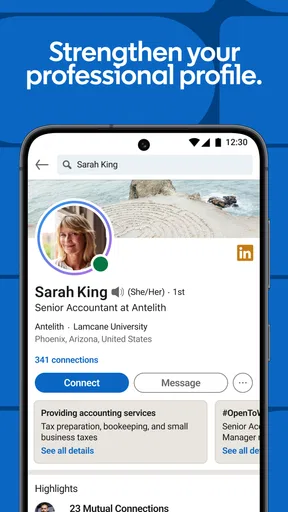
For a first setup, I’d focus on a clear current role or goal, a concise description of the work you do, and a profile photo you are comfortable using professionally. You do not need to fill every field before the app becomes useful. A truthful, specific profile is more helpful than a polished-sounding one that hides what you actually want to do.
Then choose a small number of job titles, locations, and companies that genuinely fit. This gives recommendations a better starting point and makes it easier to notice when a listing is relevant. If you are exploring a career change, include both your current specialty and the type of role you hope to move into; otherwise, a narrow profile can keep surfacing more of the same.
Features That Stand Out
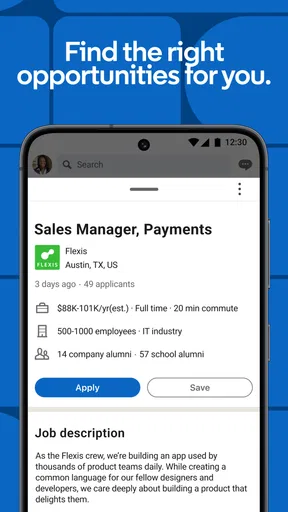
One of the coolest features is the job search function. You can filter jobs by location, industry, and even by the specific companies you’re interested in. The app also offers a "LinkedIn Easy Apply" option, which is a total game-changer. You can apply for jobs with just a few taps, without having to fill out endless forms. Trust me, it’s a lifesaver.
Easy Apply is most useful when your profile already presents the experience a recruiter needs to assess. I treat a quick application as a way to reduce repetitive form-filling, not as a reason to apply indiscriminately. Before submitting, I check that my profile matches the role and that the listing’s requirements make sense for me. A few minutes spent tailoring my profile or preparing relevant details can be more valuable than sending many applications in a rush.
One practical way to use search is to save a promising role for a second look rather than applying while distracted. When I return to it, I can compare its responsibilities with similar openings and decide whether the fit is real. That small pause helps separate a job that merely has an appealing title from one that suits my skills and working goals.
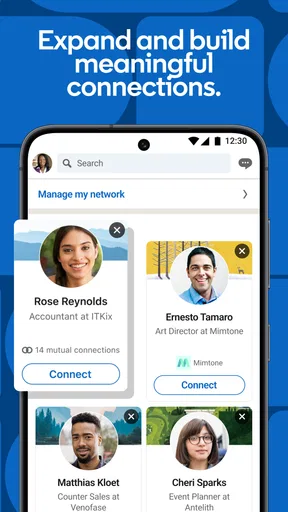
Then there’s the networking side of things. Building connections is as easy as sending a request and adding a personalized message. The app suggests people you may know based on your current network, making it easier to expand your circle. You’ll be surprised at how quickly your professional network can grow!
I’d resist the temptation to send the same vague note to everyone. A short message that explains the connection—perhaps a shared field, a thoughtful question about someone’s work, or a genuine reason for reconnecting—gives the other person something to respond to. For someone new to the platform, following relevant people and companies can also be a lower-pressure way to learn before reaching out directly.
Business News and Insights
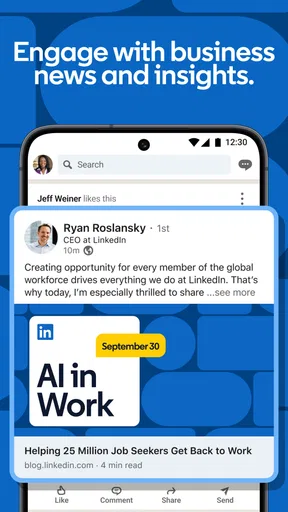
The LinkedIn: Jobs & Business News app isn’t just about job hunting. It keeps you updated with the latest trends and news in your industry. Whether it’s a groundbreaking tech innovation or a shift in market trends, you’ll be in the know. I often find myself scrolling through the news feed and stumbling upon articles that spark new ideas. It’s like having a pocket-sized mentor guiding you through the business world.
I find the feed most worthwhile when I use it with a question in mind: what are people in my field discussing, which companies are changing direction, or what skills keep appearing in conversations? That turns browsing into a lightweight form of research. It is still a social feed, though, so popularity does not automatically make a post accurate or useful. I’d check important claims against reliable sources before acting on them or repeating them.
A realistic routine might be checking the app over breakfast, saving one suitable opening, and reading a post from a company or professional whose work is relevant. Later, I could return to the role with a clearer head and decide whether to apply. This is more manageable than keeping the feed open throughout the day, and it gives each visit a purpose.
Learning and Development
Ever heard of LinkedIn Learning? This feature offers a plethora of courses and tutorials that you can access right from the app. Whether you want to brush up on your coding skills or dive into digital marketing, there's something for everyone. It’s like having a mini university at your fingertips, and it’s perfect for lifelong learners.
I would connect learning to a real next step rather than collecting courses for the sake of it. If a role repeatedly asks for a skill I am actively developing, a relevant course can help me organize that effort. It does not replace hands-on practice or prove competence on its own, so I’d pair study with a small project or a chance to use the skill at work. Access to learning content may depend on the option selected, so I would check the terms shown in the app before relying on a particular course.
Customization and Personalization
What’s great is how the app personalizes your experience. The more you interact with the app, the better it understands your preferences and interests. It’s like having a personal assistant curating content just for you. From job recommendations to news articles, everything is tailored to fit your career goals and interests.
That convenience comes with a trade-off: recommendations reflect the signals the app has about you, and those signals may not capture a new interest immediately. If the feed feels off, I would adjust what I follow and search for the roles or topics I actually want, rather than assuming the first set of suggestions is definitive. For a career pivot, actively exploring unfamiliar titles can help broaden what appears.
Notifications are another setting worth reviewing early. A message about a relevant opportunity can be useful; repeated prompts about activity you do not care about can make the app feel demanding. I’d keep alerts that support a specific goal and quiet the rest. This makes it easier to use LinkedIn intentionally without letting it interrupt every spare moment.
Where It Can Frustrate
As much as I love the app, there are a few areas where it could improve. Occasionally, the notifications can be a bit overwhelming. It’s like your phone suddenly turns into a busy switchboard. A little tweak here and there to manage these notifications would make the experience even smoother.
Also, while the job search feature is fantastic, sometimes the listings aren't updated in real-time. It's a minor hiccup, but staying on top of that would ensure users get the most current opportunities.
That uncertainty is a reason to treat a listing as a lead, not a guarantee that a position is still open. Before investing time in an application, I’d review the role details and follow the employer’s application instructions. If a listing seems stale or unclear, searching the company’s own careers page can be a sensible cross-check.
There is also a difference between having a large network and having a useful one. A high connection count does not ensure thoughtful advice, relevant introductions, or a suitable job. I get more value from a smaller group of people whose work I understand and whose updates I can engage with meaningfully. The app can help me find those people, but the relationship still takes attention beyond a tap.
Who It Suits, and What to Try Next
I’d recommend it to job seekers who want one place to discover roles, keep a professional profile current, and make direct connections. It is also useful if you are employed but want to keep an eye on your industry or quietly learn what skills and organizations are attracting attention. Students and people early in their careers can use it to explore job titles and see how professionals describe their work, as long as they approach profiles as examples rather than templates to copy.
It may be a poor fit if you want a dedicated job board with minimal social content, or if maintaining a public professional profile feels like more work than you want. A company careers page can be better for checking a specific employer’s vacancies, while a specialist job board may be more focused on a particular field. I see LinkedIn as strongest when discovery and professional networking matter alongside applying, not as the only place to search.
The app is free to download, with in-app purchases ranging from about $7.49 to $899.88 per item. I’d use the free experience to decide whether its job search, networking, and content fit my routine before paying for anything. The current version is 4.1.1166, and the app first arrived on April 7, 2011; it supports devices running version 9 or later of its minimum operating system. Those details matter most when checking compatibility or deciding whether optional paid features make sense for your needs.
The Verdict
So, should you download the LinkedIn: Jobs & Business News app? Absolutely! It’s a powerful tool for anyone looking to advance their career or stay updated on business trends. The networking opportunities alone make it worth having on your phone. Plus, with all the added features like LinkedIn Learning and personalized content, it’s more than just a job search app—it’s a comprehensive career platform.
Whether you're a seasoned professional or just starting out, this app has a little something for everyone. So go ahead, give it a whirl, and watch your professional world expand right at your fingertips.
My advice for a first meaningful result is simple: make your profile honest and clear, follow a few relevant companies, and search for one role you would genuinely consider. Save it, check the requirements carefully, then either apply thoughtfully or use it to identify a skill to build. That gives you a concrete reason to return without expecting the app to make the career decision for you.
For me, LinkedIn earns a place on the phone when I use it as a tool rather than a destination. Its mix of jobs, professional connections, and industry discussion is convenient, but it rewards a bit of judgment: verify opportunities, choose contacts with care, and keep the feed and alerts under control. If that balance suits you, it can make the first steps toward a new opportunity feel much more approachable.
Privacy and Permissions
See what permissions an app requests and how it handles your data.
- Identity
- find accounts on the device, add or remove accounts
- Calendar
- read calendar events plus confidential information
- Contacts
- find accounts on the device, read your contacts, modify your contacts
- Location
- approximate location (network-based), precise location (GPS and network-based)
- Phone
- read phone status and identity
- Photos/Media/Files
- read the contents of your USB storage, modify or delete the contents of your USB storage
- Storage
- read the contents of your USB storage, modify or delete the contents of your USB storage
- Camera
- take pictures and videos
- Microphone
- record audio
- Wi-Fi connection information
- view Wi-Fi connections
- Device ID & call information
- read phone status and identity
- Other
- view network connections, create accounts and set passwords, pair with Bluetooth devices, full network access, change your audio settings, control Near Field Communication, read sync settings, run at startup, control vibration, prevent device from sleeping, toggle sync on and off, Google Play license check, read Google service configuration
Verdict
Strengths of LinkedIn: Community & Network
- Professional networking opportunities.
- Access to industry news and insights.
- Easy job application process.
- Endorsement and recommendation features.
- Customizable profile showcasing skills.
Limitations of LinkedIn: Community & Network
- Limited features without premium.
- Occasional irrelevant job suggestions.
- Overwhelming notifications at times.
- Profile visibility can be restricted.
- Time-consuming to maintain profile.
Other Releases by LinkedIn
View All
LinkedIn Learning
Education4.8

LinkedIn Sales Navigator
Business4.3
Similar Picks in This Category
View All
Zoom Workplace
zoom.com4.1

Microsoft Teams
Microsoft Corporation4.6

Meta Business Suite
Meta Platforms, Inc.4.6

Webex Meetings
Cisco Systems, Inc.4.5

TeamViewer Remote Control
TeamViewer4.4

File Commander Manager & Vault
MobiSystems4.2
You May Also Like
View All


Frequently Asked Questions
What are the main features of LinkedIn: Jobs & Business News?
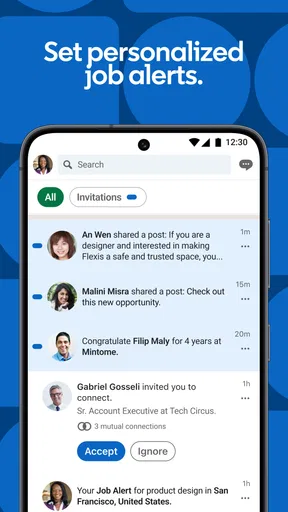
LinkedIn offers a robust platform for professional networking, job searching, and industry news. Users can create detailed profiles, connect with colleagues, and follow companies. The app provides job alerts tailored to your preferences and industry news updates to keep you informed about the latest trends and developments.
Is LinkedIn: Jobs & Business News free to use, or are there paid features?
LinkedIn is free to download and use, but it offers premium subscriptions with additional features. The premium version includes advanced job insights, InMail messaging, and learning courses. These features can enhance your job search and networking opportunities, but the free version is sufficient for basic professional networking.
How secure is my data on LinkedIn: Jobs & Business News?
LinkedIn prioritizes user privacy and data security through encryption and robust security measures. Users have control over their privacy settings, allowing them to manage who can see their information. It's important to regularly review and update your privacy settings to ensure your data is protected.
Can I use LinkedIn: Jobs & Business News for job searching only?
Yes, LinkedIn is an excellent tool for job searching, offering a comprehensive job board with filters to match your skills and preferences. However, it also serves as a platform for networking, learning new skills, and staying updated with industry news, making it more versatile than a standard job board.
What are the benefits of connecting with others on LinkedIn: Jobs & Business News?
Connecting with professionals on LinkedIn can expand your network, opening doors to new job opportunities and collaborations. It allows you to receive endorsements and recommendations, which can enhance your profile's credibility. Networking on LinkedIn also keeps you informed about industry trends and potential career paths.
